In a world where our digital footprints are constantly under surveillance, a reliable VPN has evolved from a luxury to a necessity. Secure VPN, a popular free service on the Google Play Store, positions itself as a "lightning-fast" solution for safer, anonymous internet browsing. With over 2.3 million ratings and an impressive 4.6-star average, it clearly has a massive user base. But does this app, promising free and unrestricted access, truly deliver on its security and performance claims?
This comprehensive review breaks down everything Secure VPN offers, from its core features and recent updates to critical privacy considerations and what real users are saying. Whether you're a privacy novice or a seasoned netizen, this analysis will help you decide if Secure VPN deserves a spot in your digital toolkit.
One-Tap Simplicity and Global Reach
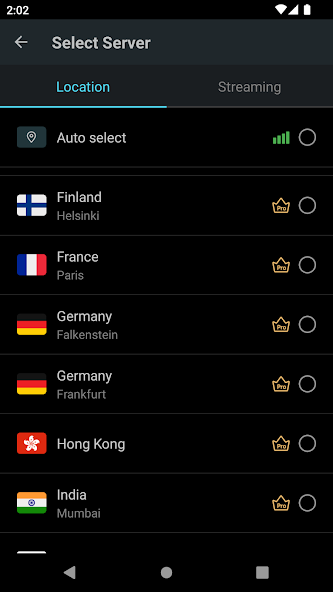
Secure VPN's primary appeal lies in its simplicity. The app requires no configuration or registration—just a single tap connects you to its global network. This ease of use is a major advantage for users who want instant protection without technical hurdles. The service boasts a network of servers across the United States, Europe, and Asia, with promises of expansion, allowing users to switch virtual locations by clicking a flag icon.
Beyond basic connectivity, the app offers a few handy features. It allows you to choose which specific applications use the VPN, a feature that works on Android 5.0 and above. It also intelligently selects servers for optimal performance and is compatible with all mobile data carriers, including 5G, LTE, and 4G. For a free service, the absence of usage and time limits is a significant selling point, removing the anxiety of hitting a data cap while browsing.
Decoding the User Experience: Praise and Pitfalls
The overwhelming majority of user reviews are positive, often praising the app's high speed, stability, and user-friendly interface. Many users describe it as one of the best free VPNs available, with some even calling it "excellent" and "very reliable" for daily use. The fact that it's completely free, with no registration required, is a recurring theme in commendations.
However, a deeper look at the lower-rated reviews reveals consistent issues. A primary complaint involves connectivity difficulties, particularly for users in certain regions. One reviewer explicitly noted that the service is "very hard to connect" when using domestic SIM cards, working better only with international ones. Other users report frequent disconnections, constant verification loops, or even that the app has become slower and less reliable over time.
The Ad-Supported Model and Its Impact on Performance
One of the most critical aspects of Secure VPN's free model is its reliance on ads. While the developer acknowledges "a little advertising" in the app's design, user feedback suggests this can be more intrusive. Several reports indicate that ads can interrupt the browsing experience, sometimes causing a temporary disconnection from the VPN service. This trade-off is common for free apps, but it's essential to consider whether the interruption is acceptable for your needs.
A particularly insightful user review compared Secure VPN unfavorably to another service, stating that the constant ad breaks made it impossible to download apps, while simultaneously praising a different, more stable free alternative for app updates. This highlights a crucial point: if you need a stable, uninterrupted connection for data-heavy tasks like large downloads, the ad-supported model of Secure VPN might be a significant hindrance.
Crucial Privacy Considerations and Data Handling
Secure VPN claims to be more secure than a typical proxy by encrypting your internet connection to prevent third-party tracking—a standard and necessary feature. It also asserts a "strict no-log policy," which is a cornerstone of trust for any VPN provider. However, a careful look at its data safety section on the Play Store reveals a more complex picture.
While the app states that data is encrypted in transit, it also mentions that it may share "app info and performance" data with third parties and collect "app info and performance" and "device ID or other ID." This directly contradicts the promise of complete anonymity. Furthermore, the policy notes that "data cannot be deleted," which raises questions about long-term data retention. The presence of any data collection, even for performance optimization, is a significant point of deliberation for users whose primary goal is absolute privacy.
Weighing the Pros and Cons for Practical Use
To synthesize the experience, let's break down the clear advantages and notable drawbacks of Secure VPN based on its features and user feedback.
If you value these benefits, Secure VPN might be for you:
- Zero Cost: It's completely free with no time or data limits, which is rare.
- Ease of Use: One-tap connection and no registration or configuration required.
- Good Speeds: Many users report a fast and stable connection for general browsing.
- Global Servers: A decent network of servers across three continents allows for basic geo-unblocking.
- Smart Features: Per-app VPN selection and smart server selection enhance usability.
However, you should be aware of these significant drawbacks:
- Intrusive Ads: Advertisements are present and can interrupt your connection and browsing.
- Privacy Concerns: Despite a no-log claim, the app collects device and performance data.
- Connectivity Issues: Inconsistent connection stability, especially for users in certain regions.
- Data Retention Policy: The fact that "data cannot be deleted" is a major red flag.
- Potential for Slowdown: Some users report that the app itself causes slowdowns or freezes over time.
Practical Tips for a Better Experience
If you decide to try Secure VPN, the developer provides a helpful guide for fixing connection failures. You can click the flag icon, use the refresh button to check available servers, and then select the fastest and most stable one to reconnect. This manual server switching can sometimes resolve stability issues when the auto-connect feature fails.
It's also wise to manage your expectations regarding performance. For lightweight activities like reading articles or using messaging apps, this VPN is likely sufficient. However, for bandwidth-intensive tasks such as streaming high-definition video or downloading large files, you may find the ad interruptions and potential speed throttling frustrating.
Final Verdict: A Free Tool with Clear Trade-offs
Secure VPN offers a compelling, free, and easy-to-use service that effectively meets the basic needs of many users. Its simplicity and lack of time limits are its strongest assets, and for casual browsing, it provides a satisfactory level of security and access.
However, the compromises are significant. The intrusive ad model, the collection of device data, and the reported connectivity issues in certain regions make it a less-than-ideal choice for users requiring high privacy, absolute anonymity, or uninterrupted, high-speed performance. It is a useful tool for occasional use, but you should enter into it with your eyes wide open, understanding that you are trading some data and convenience for a free service. Ultimately, for those seeking a robust, privacy-first solution without interruptions, investing in a premium paid VPN might still be the most secure path forward.